
Building a SQL Analyst Agent
How to build a simple AI SQL analyst agent with Node.js, OpenAI, Vercel AI SDK, and SQLite.
Motivation
In this article, I’m gonna build a small but actually useful AI agent: a SQL analyst that takes a plain English question, checks the database schema, writes SQL, runs it, and explains the result in normal language.
I like this example because it clearly shows why agents are better than one-shot prompts for this kind of task. Instead of guessing table names and columns from the start, the model can inspect the schema step by step, recover from mistakes, and build the answer from actual data.
Prerequisite
I’m building this agent with Node.js. For the agent loop and tool definitions, I’m using the Vercel AI SDK together with OpenAI. For the model, I’m using gpt-4.1-mini. It’s cheap, fast, and more than enough for a project like this.
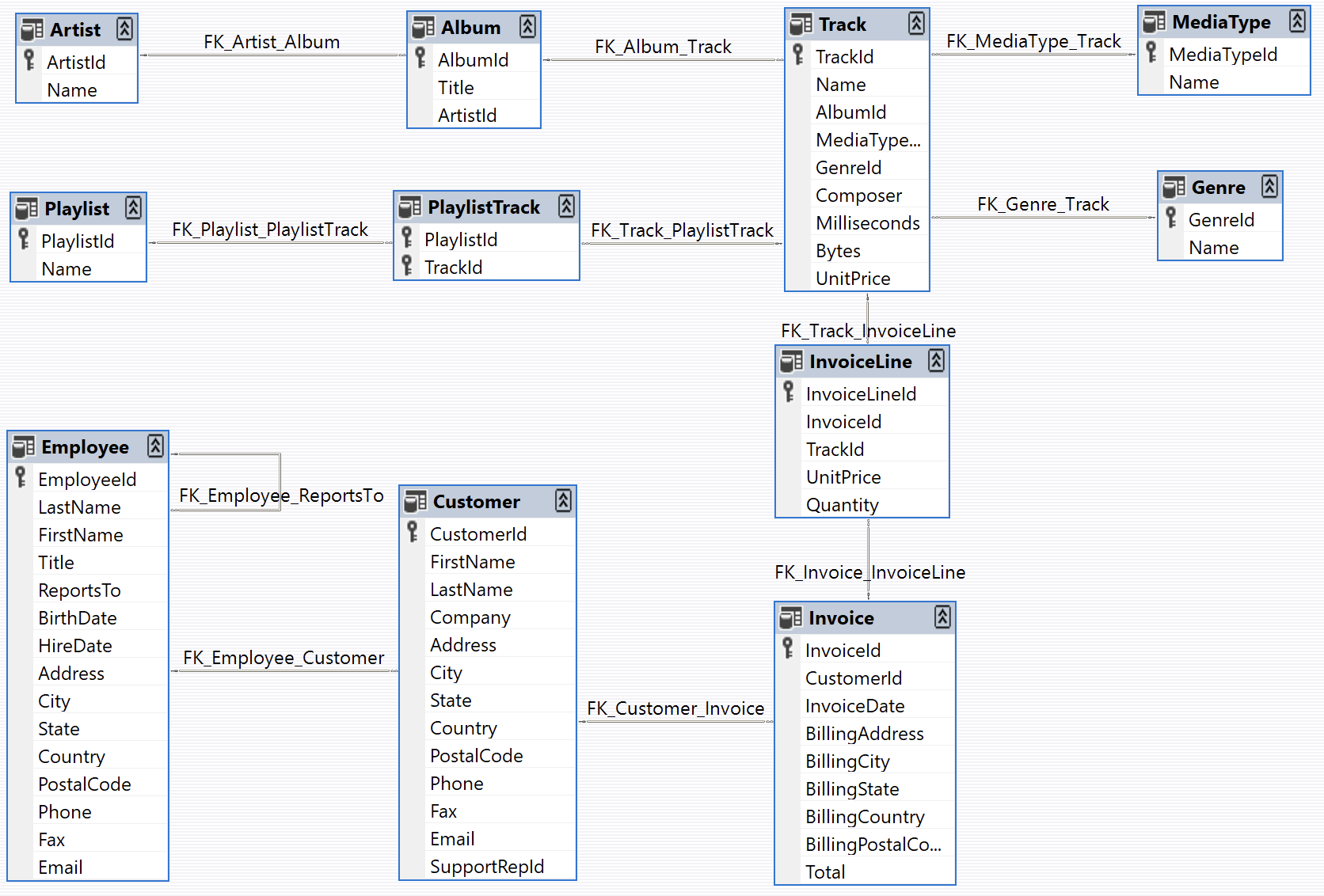
Of course, we also need a database the agent can query. For that, I’m using the Chinook database, which is a very popular sample dataset for SQL demos and tutorials.
Chinook is a sample database available for SQL Server, Oracle, MySQL, etc. It can be created by running a single SQL script. Chinook database is an alternative to the Northwind database, being ideal for demos and testing ORM tools targeting single and multiple database servers.
The Chinook data model represents a digital media store, including tables for artists, albums, media tracks, invoices and customers.
Seed Database
For this example, I’m using SQLite. It’s serverless, embedded, and perfect for a small demo like this because you don’t need to run a separate database server.
To work with it in Node.js, I’m using better-sqlite3. It’s simple, fast, and honestly one of the easiest ways to work with SQLite in a Node project.
npm install better-sqlite3import Database from 'better-sqlite3'
import { readFileSync } from 'node:fs'
import { resolve } from 'node:path'
const DB_PATH = resolve('chinook.db')
const SQL_PATH = resolve('seed.sql')
const db = new Database(DB_PATH)
const sql = readFileSync(SQL_PATH, 'utf8')
db.exec(sql)
const counts = db
.prepare(
`SELECT 'Artists' AS name, COUNT(*) AS rows FROM Artist
UNION ALL SELECT 'Albums', COUNT(*) FROM Album
UNION ALL SELECT 'Tracks', COUNT(*) FROM Track
UNION ALL SELECT 'Customers', COUNT(*) FROM Customer
UNION ALL SELECT 'Invoices', COUNT(*) FROM Invoice
UNION ALL SELECT 'InvoiceLines', COUNT(*) FROM InvoiceLine`
)
.all()
console.table(counts)
db.close()After seeding the database, you should be able to inspect the data and make sure everything loaded correctly.
Below is an interactive view of the Chinook tables. You can switch between the tabs and explore the columns and rows inside each table.
AI Agent Tools
Now let’s talk about the agent part.
I’m using the Vercel AI SDK to define tools and let the model decide when to call them. OpenAI handles the language side of things: understanding the user request, choosing the right tool, and turning the final query result into a human-readable answer.
This is the important part: the model is not just making up an answer from memory. It can inspect the database first, understand the schema, write a query, run it, and then answer based on real output. That makes the whole thing way more reliable and much easier to debug.
npm install ai @ai-sdk/openai zodFor this agent, we only need three tools:
listTablesto discover which tables exist.describeTableto inspect columns and relationships.runSqlto execute the final read-only query.
I split the tools this way on purpose. It pushes the model into a safer workflow: first explore, then write SQL. In practice, this helps a lot with reducing hallucinated table names, wrong column names, and broken queries.
import { tool } from 'ai'
import { z } from 'zod'

import { db } from './db.mjs'

export const runSql = tool({
  description: 'Execute a read-only SQL query against the Chinook database. Returns up to 100 rows. Use this after inspecting the schema with listTables and describeTable.',
  inputSchema: z.object({
    query: z.string().describe('A single SELECT statement. No writes.')
  }),
  execute: async ({ query }) => {
    if (!/^\s*select/i.test(query)) {
      return {
        error: 'Only SELECT queries are allowed.'
      }
    }

    try {
      const rows = db.prepare(query).all()

      return {
        rows: rows.slice(0, 100),
        rowCount: rows.length
      }
    } catch (e) {
      return {
        error: e.message
      }
    }
  }
})
Once the tools are ready, the main function is actually very small. All it really does is pass the user question into generateText together with the model, the system prompt, the tools, and a stopping condition.
The interesting part is not the amount of code here. The important part is the flow it creates. The model can inspect the schema, decide which tool to call next, retry if a query fails, and stop once it has enough information to answer properly.
import { generateText, stepCountIs } from 'ai'
import { openai } from '@ai-sdk/openai'
import dotenv from 'dotenv'

import { describeTable } from './tools/describe-table.mjs'
import { runSql } from './tools/run-sql.mjs'
import { listTables } from './tools/list-tables.mjs'
import { SystemPrompt } from './system-prompt.mjs'

dotenv.config()

export async function main(question) {
  const result = await generateText({
    model: openai('gpt-4.1-mini'),
    system: SystemPrompt,
    prompt: question,
    tools: { listTables, describeTable, runSql},
    stopWhen: stepCountIs(10)
  })

  return {
    answer: result.text,
    steps: result.steps,
  }
}

main('Which country has the highest average invoice total?')
These are the last two pieces: the database connection and the system prompt.
The database module keeps SQLite access in one place so all tools use the same connection. The system prompt tells the agent how to behave: inspect the schema first, only run SELECT queries, and then turn the result into a clean answer for the user. Even in a simple project like this, a good system prompt makes a huge difference.
import Database from 'better-sqlite3'
import { resolve } from 'node:path'

const db = new Database(resolve('chinook.db'), {
  readonly: false,
  fileMustExist: true
})

db.pragma('journal_mode = WAL')

export { db }
Live example
Now everything is ready, and here is the live version of the SQL analyst agent.
You can ask different questions about the Chinook dataset and see how the agent behaves. It’s a nice way to watch the full loop in action: understand the question, inspect the schema, generate SQL, run it, and summarize the result.
Ask questions about the Chinook music database in plain English
Download
If you want to try the full project locally, you can download the complete example from GitHub: Download Full Example.
That version includes the seed data, the tool definitions, the system prompt, and the small UI used in this post, so you can run it, tweak it, and extend it with your own queries or even a different dataset.
Conclusion
This project is intentionally small, but it shows the core idea behind a lot of useful AI agents. The value does not come from building a huge system or some overly complicated orchestration layer. It comes from giving the model a clear job, a small set of useful tools, and a workflow that lets it inspect real data before answering.
A SQL analyst agent is a really good starting point because the feedback loop is tight. The model checks the schema, writes a query, sees the result, and adjusts if needed. Once that pattern is working, you can take it much further by adding query safety checks, supporting more databases, streaming steps to the UI, or even generating charts and reports.
If you’re learning how to build agents, this is exactly the kind of example worth building yourself. It’s simple enough to understand from start to finish, but still realistic enough to teach the habits that actually matter in bigger systems.
Rarely, but worth it
A short note whenever I publish something new.
Plus one newsletter-only post each month.